Cơ bản về Nginx: Cài đặt, cấu hình và xử lý sự cố
Sơ đồ trang
- Nginx hoạt động như thế nào: Kiến trúc và Nguyên tắc
- Cài đặt Nginx: Khởi đầu nhanh
- Cấu hình cơ bản: Những bước đầu tiên
- Cấu hình nâng cao và Tối ưu hóa
- Giám sát và Ghi log
- So sánh với các đối thủ
- Xử lý các vấn đề thường gặp
- Lệnh hữu ích cho chẩn đoán
- Cách sử dụng đặc biệt
- Bảo mật
- Giám sát và Metrics
- Các tính năng mới nhất của Nginx (2025-2026)
- Kết luận và khuyến nghị
Nếu bạn muốn tìm hiểu về web server đang chạy trên phân nửa internet, bài viết này dành cho bạn. Nginx (phát âm là “engine-x”) không chỉ là một web server thông thường, nó là con dao đa năng trong thế giới HTTP.
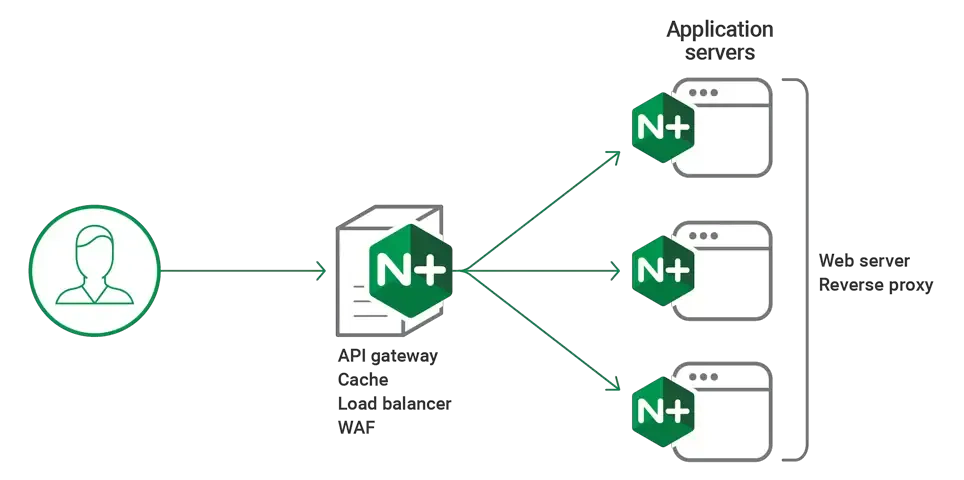
Nginx có thể hoạt động như reverse proxy, load balancer, caching server và nhiều hơn thế nữa, đặc biệt Nginx tiêu thụ ít bộ nhớ hơn Apache gấp nhiều lần, đồng thời xử lý hàng nghìn kết nối đồng thời mà không gặp vấn đề gì.
Ở đây chúng ta sẽ đi từ con số 0: từ cài đặt đến tinh chỉnh cấu hình và giải quyết các vấn đề chắc chắn sẽ phát sinh. Sẽ có nhiều thực hành, ví dụ cấu hình thực tế và lời khuyên từ kinh nghiệm thực chiến.
Nginx hoạt động như thế nào: Kiến trúc và Nguyên tắc
Nginx sử dụng kiến trúc event-driven (hướng sự kiện), khác biệt căn bản so với cách tiếp cận process-based (dựa trên tiến trình) của Apache. Thay vì tạo một tiến trình hoặc luồng riêng cho mỗi kết nối, Nginx sử dụng xử lý sự kiện bất đồng bộ. Một worker process có thể xử lý hàng nghìn kết nối đồng thời.
Các thành phần chính:
- Master process — quản lý các worker process, đọc cấu hình
- Worker processes — xử lý các HTTP request
- Cache loader — tải cache vào bộ nhớ khi khởi động
- Cache manager — quản lý kích thước cache
Điều thú vị: Nginx có thể phục vụ các file tĩnh nhanh gấp 10 lần Apache nhờ sử dụng system call sendfile(), cho phép truyền file trực tiếp từ kernel space đến network socket, bỏ qua user space.
Cài đặt Nginx: Khởi đầu nhanh
Bắt đầu với việc cài đặt. Đối với production, tôi khuyên bạn nên sử dụng VPS hoặc dedicated server với Ubuntu/Debian/Almalinux.
Bài viết liên quan
Ubuntu/Debian
sudo apt update
sudo apt install nginx
sudo systemctl start nginx
sudo systemctl enable nginx
Almalinux/RHEL
sudo yum install epel-release
sudo yum install nginx
sudo systemctl start nginx
sudo systemctl enable nginx
Cài đặt phiên bản mới nhất từ kho chính thức
Nginx hiện có hai nhánh phát triển:
- Stable version: 1.28 – Khuyến nghị cho production
- Mainline version: 1.29.4 – Phiên bản phát triển với tính năng mới nhất
Để cài đặt phiên bản mainline trên Ubuntu:
# Thêm repository chính thức của Nginx
sudo apt install curl gnupg2 ca-certificates lsb-release ubuntu-keyring

curl https://nginx.org/keys/nginx_signing.key | gpg --dearmor \
    | sudo tee /usr/share/keyrings/nginx-archive-keyring.gpg >/dev/null

# Cho mainline version
echo "deb [signed-by=/usr/share/keyrings/nginx-archive-keyring.gpg] \
http://nginx.org/packages/mainline/ubuntu `lsb_release -cs` nginx" \
    | sudo tee /etc/apt/sources.list.d/nginx.list

# Hoặc cho stable version
echo "deb [signed-by=/usr/share/keyrings/nginx-archive-keyring.gpg] \
http://nginx.org/packages/ubuntu `lsb_release -cs` nginx" \
    | sudo tee /etc/apt/sources.list.d/nginx.list

sudo apt update
sudo apt install nginx
Biên dịch từ mã nguồn (dành cho các geek)
# Download phiên bản stable
wget http://nginx.org/download/nginx-1.28.0.tar.gz
tar -xzf nginx-1.28.0.tar.gz
cd nginx-1.28.0

# Hoặc download phiên bản mainline
wget http://nginx.org/download/nginx-1.29.4.tar.gz
tar -xzf nginx-1.29.4.tar.gz
cd nginx-1.29.4

./configure --prefix=/etc/nginx \
    --sbin-path=/usr/sbin/nginx \
    --conf-path=/etc/nginx/nginx.conf \
    --with-http_ssl_module \
    --with-http_v2_module \
    --with-http_v3_module \
    --with-stream \
    --with-stream_ssl_module
make
sudo make install
Kiểm tra phiên bản đã cài đặt
nginx -v
# nginx version: nginx/1.28.0 hoặc nginx/1.29.4
Lưu ý quan trọng:
- Stable (1.28): Ổn định, được khuyến nghị cho môi trường production
- Mainline (1.29.4): Có các tính năng mới nhất (HTTP/3, QUIC improvements), phù hợp nếu bạn muốn trải nghiệm công nghệ mới hoặc cần các tính năng cụ thể
Tại sao biên dịch từ mã nguồn?
Bạn có thể chỉ bật các module cần thiết, giảm kích thước binary và tăng bảo mật. Ngoài ra, bạn có thể tích hợp các module bên thứ ba không có sẵn trong gói cài đặt mặc định.
Cấu hình cơ bản: Những bước đầu tiên
File cấu hình chính nằm ở /etc/nginx/nginx.conf. Đây là cấu hình tối thiểu có thể hoạt động:
user nginx;
worker_processes auto;
error_log /var/log/nginx/error.log;
pid /run/nginx.pid;

events {
    worker_connections 1024;
    use epoll;
}

http {
    include /etc/nginx/mime.types;
    default_type application/octet-stream;

    sendfile on;
    tcp_nopush on;
    tcp_nodelay on;
    keepalive_timeout 65;

    gzip on;
    gzip_vary on;
    gzip_min_length 1000;
    gzip_types text/plain application/xml text/css application/javascript;

    include /etc/nginx/conf.d/*.conf;
    include /etc/nginx/sites-enabled/*;
}
Cấu hình Virtual Host
Tạo file /etc/nginx/sites-available/example.com:
server {
    listen 80;
    server_name example.com www.example.com;
    root /var/www/example.com;
    index index.html index.php;

    location / {
        try_files $uri $uri/ =404;
    }

    location ~ \.php$ {
        fastcgi_pass unix:/var/run/php/php8.3-fpm.sock;
        fastcgi_index index.php;
        fastcgi_param SCRIPT_FILENAME $document_root$fastcgi_script_name;
        include fastcgi_params;
    }

    location ~* \.(jpg|jpeg|png|gif|ico|css|js|webp|avif)$ {
        expires 1y;
        add_header Cache-Control "public, immutable";
    }
}
Kích hoạt site:
sudo ln -s /etc/nginx/sites-available/example.com /etc/nginx/sites-enabled/
sudo nginx -t
sudo systemctl reload nginx
Cấu hình nâng cao và Tối ưu hóa
Cấu hình SSL/TLS
Web hiện đại không có HTTPS là không thể chấp nhận được. Đây là cấu hình với SSL:
server {
    listen 443 ssl http2;
    server_name example.com;

    ssl_certificate /etc/letsencrypt/live/example.com/fullchain.pem;
    ssl_certificate_key /etc/letsencrypt/live/example.com/privkey.pem;

    ssl_protocols TLSv1.2 TLSv1.3;
    ssl_ciphers ECDHE-RSA-AES128-GCM-SHA256:ECDHE-RSA-AES256-GCM-SHA384;
    ssl_prefer_server_ciphers off;

    ssl_session_cache shared:SSL:10m;
    ssl_session_timeout 10m;

    add_header Strict-Transport-Security "max-age=31536000; includeSubDomains" always;
    add_header X-Frame-Options DENY;
    add_header X-Content-Type-Options nosniff;

    location / {
        root /var/www/example.com;
        index index.html;
    }
}

server {
    listen 80;
    server_name example.com;
    return 301 https://$server_name$request_uri;
}
Reverse Proxy và Load Balancing
Nginx hoạt động xuất sắc như reverse proxy. Đây là cấu hình để proxy sang ứng dụng Node.js:
upstream backend {
    server 127.0.0.1:3000;
    server 127.0.0.1:3001;
    server 127.0.0.1:3002;
}

server {
    listen 80;
    server_name api.example.com;

    location / {
        proxy_pass http://backend;
        proxy_set_header Host $host;
        proxy_set_header X-Real-IP $remote_addr;
        proxy_set_header X-Forwarded-For $proxy_add_x_forwarded_for;
        proxy_set_header X-Forwarded-Proto $scheme;

        proxy_connect_timeout 30;
        proxy_send_timeout 30;
        proxy_read_timeout 30;
    }
}
Giám sát và Ghi log
Cấu hình ghi log chi tiết:
log_format detailed '$remote_addr - $remote_user [$time_local] '
                   '"$request" $status $body_bytes_sent '
                   '"$http_referer" "$http_user_agent" '
                   'rt=$request_time uct="$upstream_connect_time" '
                   'uht="$upstream_header_time" urt="$upstream_response_time"';

access_log /var/log/nginx/access.log detailed;
Bật module status để giám sát:
location /nginx_status {
    stub_status on;
    access_log off;
    allow 127.0.0.1;
    deny all;
}
So sánh với các đối thủ
| Tham số | Nginx | Apache | Caddy |
|---|---|---|---|
| Tiêu thụ bộ nhớ | Thấp (2-4 MB) | Cao (8-20 MB) | Trung bình (5-10 MB) |
| Kết nối đồng thời | 100,000+ | 1,000-10,000 | 10,000+ |
| SSL tự động | Không | Không | Có |
| Độ phức tạp cấu hình | Trung bình | Cao | Thấp |
| File tĩnh | Xuất sắc | Tốt | Tốt |
Xử lý các vấn đề thường gặp
Lỗi 502 Bad Gateway
Vấn đề phổ biến nhất. Nguyên nhân và giải pháp:
- PHP-FPM không chạy:
sudo systemctl start php8.3-fpm - Đường dẫn socket sai: kiểm tra
/etc/php/8.3/fpm/pool.d/www.conf - Timeout: tăng
fastcgi_read_timeout
Lỗi 413 Request Entity Too Large
Thêm vào cấu hình:
client_max_body_size 100M;
Vấn đề về hiệu suất
Cấu hình cho các site tải cao:
worker_processes auto;
worker_connections 4096;
worker_rlimit_nofile 8192;

keepalive_timeout 30;
keepalive_requests 100;

open_file_cache max=1000 inactive=20s;
open_file_cache_valid 30s;
open_file_cache_min_uses 2;
open_file_cache_errors on;
Lệnh hữu ích cho chẩn đoán
# Kiểm tra cú pháp cấu hình
nginx -t

# Reload không cần dừng
nginx -s reload

# Xem các kết nối đang hoạt động
ss -tuln | grep :80

# Phân tích log
tail -f /var/log/nginx/access.log | grep "error"

# Test hiệu suất
ab -n 1000 -c 100 http://example.com/

# Xem trạng thái process
ps aux | grep nginx
Cách sử dụng đặc biệt
Nginx như API Gateway
Nginx có thể hoạt động như API Gateway hoàn chỉnh với rate limiting:
http {
    limit_req_zone $binary_remote_addr zone=api:10m rate=1r/s;

    server {
        location /api/v1/ {
            limit_req zone=api burst=5;
            proxy_pass http://backend;
        }
    }
}
Geo-blocking
geo $blocked_country {
    default 0;
    include /etc/nginx/blocked_countries.conf;
}

server {
    if ($blocked_country) {
        return 403;
    }
}
Bảo mật
Cấu hình bảo mật cơ bản:
server_tokens off;
add_header X-Frame-Options SAMEORIGIN;
add_header X-Content-Type-Options nosniff;
add_header X-XSS-Protection "1; mode=block";

location ~ /\. {
    deny all;
}

location ~* \.(sql|log|htaccess)$ {
    deny all;
}

# Rate limiting
limit_req_zone $binary_remote_addr zone=login:10m rate=1r/m;
location /login {
    limit_req zone=login burst=3;
}
Giám sát và Metrics
Để giám sát nghiêm túc, sử dụng nginx-prometheus-exporter. Nó export metrics sang định dạng Prometheus:
docker run -p 9113:9113 nginx/nginx-prometheus-exporter:0.11.0 \
  -nginx.scrape-uri=http://nginx:8080/nginx_status
Các tính năng mới nhất của Nginx (2025-2026)
HTTP/3 và QUIC Support
Nginx hiện đã hỗ trợ HTTP/3 với QUIC protocol, cải thiện hiệu suất đáng kể:
server {
    listen 443 quic reuseport;
    listen 443 ssl;

    http2 on;
    http3 on;

    ssl_protocols TLSv1.3;
    quic_retry on;

    add_header Alt-Svc 'h3=":443"; ma=86400';
}
Dynamic Configuration với njs
Module njs (JavaScript cho Nginx) cho phép cấu hình động:
load_module modules/ngx_http_js_module.so;

http {
    js_import conf.d/http.js;

    server {
        location /api {
            js_content http.process;
        }
    }
}
Cải tiến Security Headers
# Content Security Policy mới nhất
add_header Content-Security-Policy "default-src 'self'; script-src 'self' 'unsafe-inline'; style-src 'self' 'unsafe-inline';" always;

# Permissions Policy (thay thế Feature-Policy)
add_header Permissions-Policy "geolocation=(), microphone=(), camera=()" always;

# Cross-Origin Policies
add_header Cross-Origin-Embedder-Policy "require-corp" always;
add_header Cross-Origin-Opener-Policy "same-origin" always;
add_header Cross-Origin-Resource-Policy "same-origin" always;
Kết luận và khuyến nghị
Nginx là công cụ mạnh mẽ có thể giải quyết nhiều tác vụ: từ web server đơn giản đến load balancer phức tạp. Ưu điểm chính:
- Hiệu suất cao — xử lý hàng nghìn kết nối với tiêu thụ tài nguyên tối thiểu
- Linh hoạt cấu hình — có thể cấu hình cho mọi tác vụ
- Ổn định — hoạt động hàng tháng không cần khởi động lại
- Tính module — số lượng lớn module để mở rộng chức năng
Khi nào sử dụng Nginx:
- Website tải cao
- Kiến trúc microservices (như API Gateway)
- Website tĩnh
- Reverse proxy cho ứng dụng
Khi nào nên xem xét các lựa chọn khác:
- Dự án đơn giản không có yêu cầu cao về hiệu suất — có thể dùng Caddy
- Nếu cần các module đặc biệt của Apache
- Có thể quá mức cho môi trường development
Nginx được cấu hình đúng cách là nền tảng của dịch vụ web nhanh và đáng tin cậy.
Các liên kết hữu ích để học thêm:
Nếu bạn thấy bài viết có ích bạn có thể chia sẻ bài viết
này. Yêu cầu thêm bài viết tại đây
Đã copy

Bài viết liên quan


![[Case Study] – bị thay đổi IP VPS và Nginx không hoạt động](https://vutruso.com/wp-content/uploads/2024/03/nginx-server-480x300.png "[Case Study] – bị thay đổi IP VPS và Nginx không hoạt động")